Creating a business video takes time. You have to choose a topic, write a script, record the footage, edit the final version, create a thumbnail, and then promote it. After all that work, it can be frustrating to discover that viewers are leaving after only a few seconds.
That is where audience retention data becomes useful.
Instead of guessing why a video is not performing as expected, you can look at viewer behavior and identify the moments when people lose interest, skip ahead, rewatch a section, or continue watching until the end.
Audience retention data can help businesses make better videos over time. It can reveal whether the introduction is too slow, whether the main information arrives too late, whether certain sections are confusing, or whether viewers are particularly interested in a specific part of the content.
The goal is not simply to get more views. A successful business video should hold the attention of the right audience and move viewers toward a useful next step.
What Is Audience Retention?
Audience retention measures how much of a video people watch and how long they remain engaged with it.
For example, imagine you publish a five-minute video explaining how customers can choose the right service for their needs. If many viewers leave during the first 20 seconds, the opening may not be giving them enough reason to continue.
If viewers consistently watch until the middle of the video but leave when you begin discussing a particular subject, that section deserves closer attention.
Retention data gives you a picture of what happens after someone presses play.
Depending on the platform and analytics system, you may be able to see information such as:
- Average view duration
- Average percentage viewed
- Audience retention over time
- Points where viewers leave
- Sections that receive repeated views
- Moments where viewers skip ahead
- Video completion behavior
- Differences in retention between videos
These measurements can turn video analytics into practical information for your next piece of content.
Why Audience Retention Matters for Business Videos
A business video can have an attractive thumbnail and a strong title, but those elements only help get someone to click.
The video itself has to give the viewer a reason to stay.
When people leave quickly, your message may never reach them. They may not hear about your product, understand your service, see your demonstration, or reach your call to action.
High viewer retention does not automatically mean that a video will generate customers. However, retention can help you determine whether your content is holding attention long enough to communicate its intended message.
For businesses, this creates an important feedback loop:
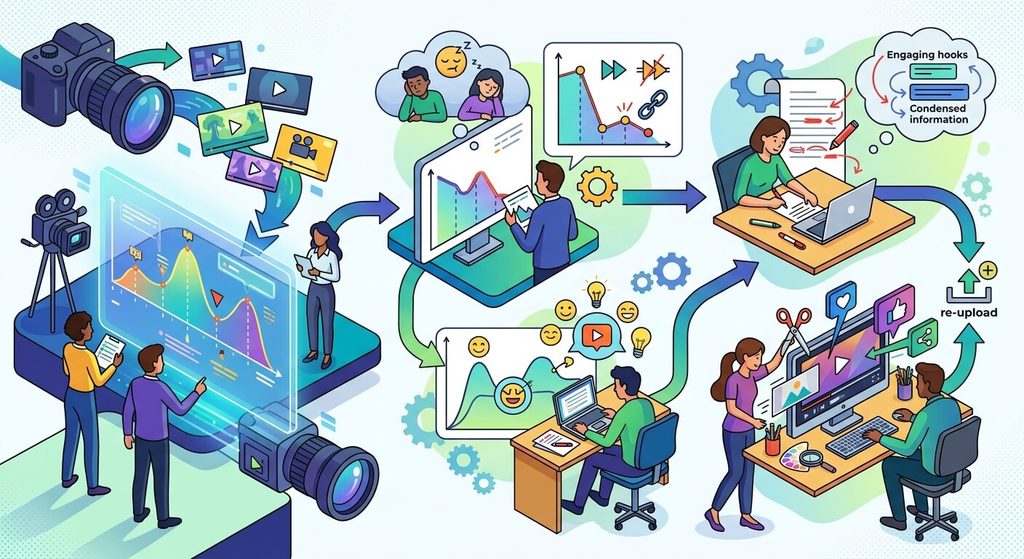
Publish → Measure → Identify problems → Improve → Publish again
Over time, this process can make your video marketing strategy more informed and consistent.
Start by Looking at the First Few Seconds
The beginning of a video deserves special attention.
People usually decide very quickly whether the content appears relevant to them. If your introduction spends too much time on greetings, company history, unnecessary background information, or vague statements, viewers may leave before reaching the useful portion.
Consider an opening such as:
“Hi everyone. Welcome back to our channel. Today we’re going to talk about…”
It is not necessarily wrong, but it may delay the information the viewer came to find.
A more direct introduction could begin with the problem:
“Not sure which garage door opener is right for your home? Here are three things to check before buying one.”
The second approach immediately establishes the subject and gives the viewer a reason to continue.
Look at your retention graph and ask:
Where does the largest early drop happen?
If there is a sharp decline near the beginning, review those opening seconds carefully.
Ask yourself:
- Did the video clearly explain what viewers would learn?
- Did I get to the point quickly?
- Does the opening match the title and thumbnail?
- Is there unnecessary introductory material?
- Does the first section address the viewer’s problem?
These questions can lead to simple improvements in future videos.
Identify Sudden Drops in Audience Retention
A gradual decline throughout a video is normal. Not everyone who starts a video will watch every second.
Sudden drops are more interesting.
A sharp decline may occur when:
- The subject changes unexpectedly
- A long introduction begins
- The speaker becomes repetitive
- A complicated explanation starts
- A promotional section appears
- The video pauses for unnecessary information
- The editing becomes slower
- The viewer’s original question has already been answered
When you see a significant drop, go back to that exact point in the video.
Do not immediately assume the problem is the subject itself. The problem could be the way the information was presented.
For example, a video about choosing business software might retain viewers well while comparing features but experience a major drop when the presenter spends two minutes discussing the company’s history.
That suggests something useful: viewers may be more interested in practical information than background material.
The next video can be structured accordingly.
Look for Retention Spikes
Retention data is not only about finding problems.
Spikes can be just as valuable.
A spike may indicate that viewers watched a particular section more frequently or returned to that portion of the video.
Suppose you publish a ten-minute video about improving local business marketing. The section covering Google Business Profile optimization receives noticeably more attention than the other sections.
That could tell you that the topic deserves more content.
You could create a dedicated video about:
“How to Optimize Your Google Business Profile for Local Customers”
The retention data has effectively helped you discover a potential content topic.
This is one of the smartest ways to use analytics. Instead of constantly guessing what your audience wants, you can use actual viewing behavior to find subjects that deserve further attention.
Pay Attention to Rewatched Sections
When viewers repeatedly watch a section, it can mean that the information is particularly useful, interesting, or difficult to understand.
There are several possible explanations.
A viewer may replay a product demonstration because they want to see how something works. They might replay instructions because they are following along. Or they may rewatch an important detail that was delivered quickly.
Do not automatically interpret every spike as proof that the section was perfect.
Instead, investigate it.
Ask:
What was happening on screen at this moment?
You might discover that viewers respond particularly well to:
- Demonstrations
- Examples
- Before-and-after comparisons
- Step-by-step instructions
- Specific statistics
- Product features
- Visual explanations
- Answers to common questions
Those patterns can influence future videos.
Compare Retention Across Similar Videos
One video rarely tells the whole story.
If you want useful insights, compare several videos that cover related subjects.
For example, a business might have five videos about social media marketing. One has a much stronger average percentage viewed than the others.
Look for differences.
Maybe the successful video:
- Gets to the point faster
- Uses a shorter introduction
- Has a clearer structure
- Answers a specific question
- Uses more demonstrations
- Has shorter sections
- Provides examples throughout
- Uses a more engaging presentation style
The purpose of comparison is not to copy one video exactly.
Instead, look for patterns.
If several of your strongest videos share similar characteristics, those characteristics can become part of your future video production process.
Improve Your Video Introductions
Audience retention data often reveals whether your introduction is doing its job.
A strong business video introduction should establish three things fairly quickly:
What is this video about?
Why should the viewer care?
What will they get from watching?
You do not need to explain everything at the beginning.
In many cases, a concise introduction works better than a long setup.
For example:
“If your website receives visitors but very few inquiries, your videos may be missing one important element. In this video, we’ll show you how to build a stronger call to action.”
The viewer immediately understands the problem and what the video intends to address.
Once you have retention data from several videos, you can compare different opening styles and see which approaches keep viewers watching longer.
Remove Unnecessary Filler
Filler can creep into business videos surprisingly easily.
Common examples include:
- Repeating the same point
- Long transitions
- Extended greetings
- Unnecessary personal stories
- Excessive disclaimers
- Repeating calls to action
- Explaining information that viewers already understand
None of these automatically makes a video bad. Context matters.
The problem occurs when they take up valuable viewing time without adding meaningful information.
If your retention data shows repeated drops during lengthy explanations, consider tightening the editing.
You do not necessarily need to make every video shorter.
You need to make every section useful.
A seven-minute video with valuable information can be more effective than a three-minute video that feels rushed or incomplete.
Use Retention Data to Improve Your Video Structure
Audience retention can also help you determine how your videos should be organized.
A simple structure might look like this:
Introduction
Tell viewers what problem the video addresses.
Main Point One
Give the first useful piece of information.
Main Point Two
Continue with another practical insight.
Example or Demonstration
Show how the concept works in a real situation.
Main Point Three
Add another important takeaway.
Summary
Briefly reinforce the key points.
Call to Action
Tell viewers what they can do next.
This structure is not mandatory for every business video, but it provides a useful starting point.
Your analytics can then tell you where viewers remain engaged and where they tend to leave.
Make the Content Match the Viewer’s Expectation
There is an important relationship between your title, thumbnail, and video content.
If the title promises one thing but the video focuses on something else, viewers may leave quickly.
For example, imagine a video titled:
“How to Create a Business Video on Your Phone”
If the first minute is spent discussing the history of mobile video production, someone looking for practical instructions may leave.
The solution is straightforward: deliver what the title promised.
Audience retention can help identify whether your content is meeting that expectation.
A strong click is only the beginning. The content has to follow through.
Use Retention Data When Writing Scripts
Analytics should not only influence editing.
It can also influence your next script.
Suppose your previous videos consistently lose viewers when you introduce a long list of five or six points at once.
Your next script could break that information into shorter sections.
Instead of:
“There are five things you need to know…”
You could introduce each idea individually and provide an example before moving to the next.
Likewise, if viewers consistently remain engaged during demonstrations, build more demonstrations into future scripts.
This creates a connection between analytics and content planning.
Your old videos become research for your new ones.
Don’t Chase Retention at the Expense of Useful Information
There is a temptation to optimize every second of a video simply to keep people watching.
That can create its own problems.
Business videos have a purpose. They may educate customers, explain a service, demonstrate a product, answer questions, generate leads, or help existing customers.
A section that causes some viewers to leave is not necessarily useless.
For example, detailed pricing information might cause casual viewers to leave but remain extremely valuable to people who are seriously considering a purchase.
That is why retention should be considered alongside other business metrics.
Look at:
- Leads
- Sales
- Click-throughs
- Website visits
- Form submissions
- Calls
- Engagement
- Comments
- Customer questions
The objective is to understand audience behavior, not manipulate viewers into watching every second.
Segment Your Audience When Possible
Not every viewer has the same reason for watching.
Someone discovering your company for the first time may behave differently from an existing customer.
Similarly, a beginner may watch differently from an experienced professional.
If your analytics platform provides audience segmentation, use it to investigate these differences.
You may discover that one group watches educational videos longer while another group responds more strongly to product demonstrations.
This information can help you create content for specific stages of the customer journey.
Instead of trying to create one video that appeals to everyone, you can develop different videos for different needs.
Use Retention Data to Improve Calls to Action
The call to action is another area worth studying.
If viewers consistently leave before reaching your CTA, you may need to reconsider where you place it.
A call to action does not always have to wait until the final seconds.
For some videos, a relevant next step can be introduced earlier.
For example:
“If you’re comparing these options for your business, we’ve created a detailed checklist you can use. We’ll show you where to find it at the end of the video.”
The CTA becomes part of the viewer’s journey rather than an interruption at the end.
Again, the goal is relevance. A CTA should make sense in the context of what the viewer has just learned.
Create More Content Around Successful Sections
One of the easiest ways to turn audience retention data into new content ideas is to expand on topics that already perform well.
Imagine a ten-minute video contains a two-minute section about creating product demonstration videos.
That section generates strong viewer interest.
Instead of simply moving on to another unrelated topic, you could develop additional content around it:
- How to Script a Product Demo Video
- Product Demo Video Mistakes to Avoid
- How to Film Product Demonstrations at Home
- Product Demo Videos for Social Media
- How to Measure Product Video Performance
One successful section can become an entire content cluster.
This approach can make your video marketing strategy more focused and easier to manage.
Keep a Video Performance Log
You do not need an elaborate system.
A simple spreadsheet can track your videos and help you identify trends.
Useful columns include:
| Video | Topic | Length | Average View Duration | Average Percentage Viewed | Major Drop-Off | Strong Section | Leads |
|---|---|---|---|---|---|---|---|
| Video 1 | Topic A | 6 min | — | — | Introduction | Demonstration | — |
| Video 2 | Topic B | 8 min | — | — | Product explanation | Example | — |
| Video 3 | Topic C | 5 min | — | — | CTA | Tutorial | — |
The exact metrics available will depend on the platform you’re using.
The important thing is consistency.
After you have enough videos in the spreadsheet, patterns become easier to spot.
Review Your Retention Data Regularly
Do not check analytics only when a video performs poorly.
Make reviewing retention part of your normal content process.
A practical routine might look like this:
After publishing: Check early performance and confirm that the video is reaching its intended audience.
After enough viewing data accumulates: Review the retention graph and identify major drops and spikes.
Before creating the next video: Use those observations when planning the structure and script.
Periodically: Compare several videos to identify broader patterns.
This turns analytics into an ongoing learning process rather than a one-time report.
Common Audience Retention Mistakes Businesses Make
There are several mistakes that can make retention data less useful.
Looking at views alone
A large number of views does not tell you how long people watched or whether they took a valuable next step.
Making decisions from one video
One unusual video may not represent your broader audience.
Ignoring the actual video
A graph can tell you where something happened. You still need to watch the corresponding section to understand why.
Optimizing only for watch time
Longer viewing is not automatically better if the content does not serve the business objective.
Copying competitors
Another company’s audience may behave differently from yours.
Changing everything at once
If you change your introduction, thumbnail, topic, video length, editing style, and CTA simultaneously, it becomes difficult to determine which change made a difference.
Instead, make thoughtful adjustments and observe the results.
Turn Audience Retention Into a Continuous Improvement System
The most useful way to think about audience retention is as feedback.
Every published video gives you information.
A drop in the opening may encourage you to improve your introductions.
A spike around a demonstration may suggest creating more practical content.
Strong retention on a particular topic may indicate an opportunity for a larger content series.
Consistent drop-offs during lengthy explanations may encourage tighter scripting and editing.
Over time, these observations can become a repeatable system:
Create → Publish → Measure → Study → Improve → Repeat
This approach is much more sustainable than trying to make every video perfect before publishing it.
Final Thoughts
Audience retention data gives businesses a window into how viewers actually experience their videos.
Instead of relying entirely on assumptions, you can examine where people stay engaged, where they leave, which sections receive additional attention, and how different videos perform against one another.
The most important step is not simply checking the retention graph. It is connecting what you see in the data to specific changes in your content.
Improve the opening when viewers leave early. Tighten sections where attention consistently drops. Expand topics that generate strong engagement. Make your videos match the expectations established by their titles and thumbnails. Then measure the results of those changes.
Video marketing becomes much more effective when every video teaches you something about the next one.
The goal is not to create videos that hold everyone’s attention from beginning to end. The goal is to create useful, relevant business videos that keep the right viewers engaged long enough to understand your message and take the next appropriate step.
The written content on this page was generated by ChatGPT.